
Free 3ds Max Plugins:
Download ArchViz Toolkit
35+ free tools in one 3ds Max panel
+4 PRO tools
Batch Render | Cam Selector | Relinker | Copypro
run fully unlocked for 21 days, no card needed.
1. Get the installer
2. Run it once
Download from the link in mail and drop into the 3ds Max viewport.
All toolkit plugins install together.
3. Start working
Activate ArchViz Toolkit for good.
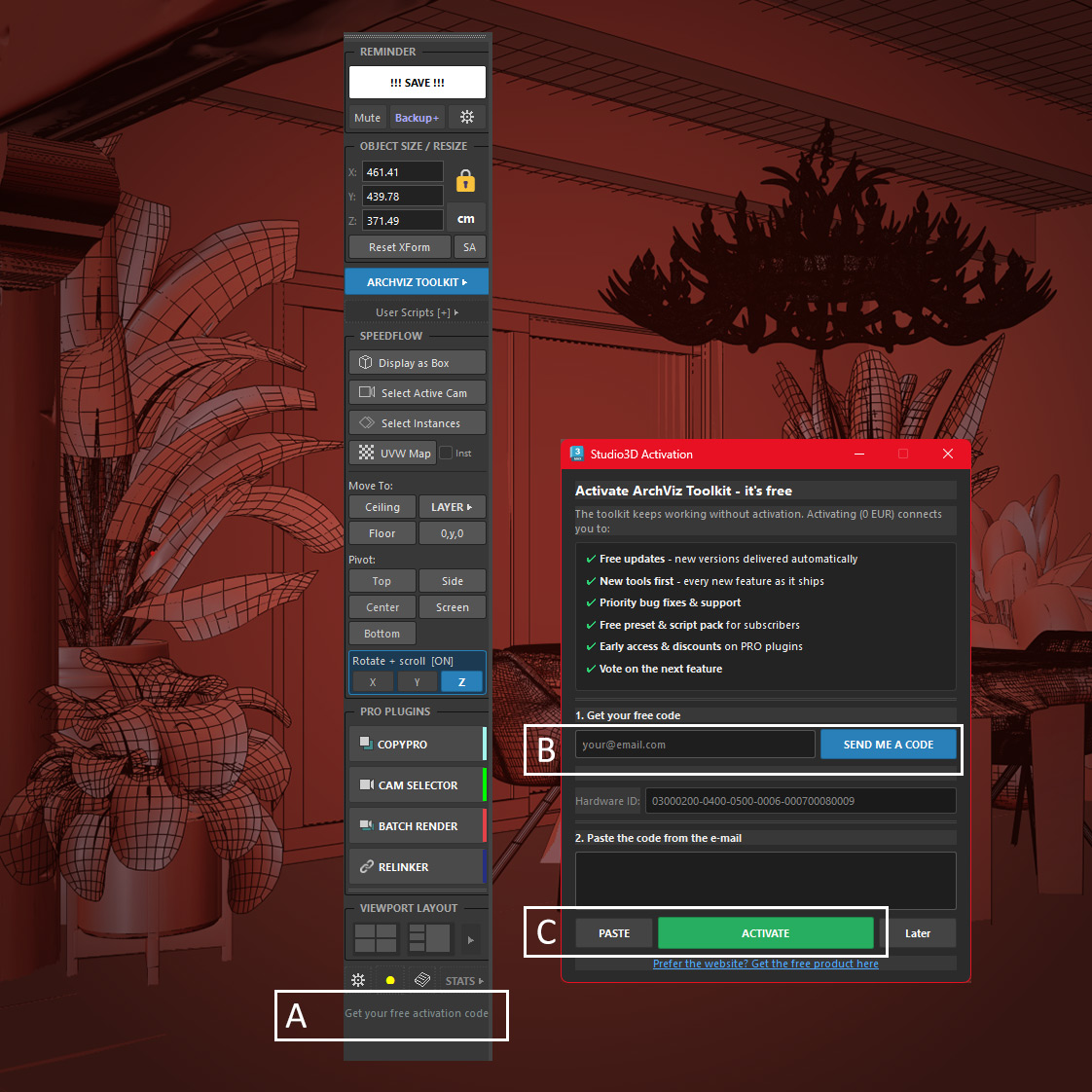
A. Click “Get your free activation code”
B. Enter your email
C. Paste the code from e-mail and activate
You can also find it any time in “MY LICENSES” on this site.
What the installer contains
ArchViz Toolkit
35+ free tools, free forever, with a lifetime activation code
&
Batch Render Pro – 21-day trial, every feature unlocked
Camera Selector – 21-day trial, every feature unlocked
Relinker Pro – 21-day trial, every feature unlocked
CopyPro – 21-day trial, every feature unlocked
You install once and get the whole workflow.
After the trial ends the Pro tools
stop opening and ArchViz Toolkit keeps working, permanently.
Nothing is removed from your scenes and no settings are lost.
3ds Max 2024-2027 · Corona, V-Ray and other renderers · Metric and imperial units · Windows
Frequently asked questions
Is ArchViz Toolkit really free?
Yes, permanently. Not a time-limited trial. You register an email address once and receive a lifetime activation code. There is no subscription and no feature locked behind an upgrade prompt inside the panel.
Do I need a credit card?
No. The trial needs an email address and nothing else.
What happens after 21 days?
The four Pro tools stop opening. ArchViz Toolkit keeps working forever with your free activation code. Your scenes and settings are untouched, and entering a licence key later picks up exactly where you stopped.
Which versions of 3ds Max are supported?
3ds Max 2024 through 2027, tested against current releases rather than left to break.
Does it work with V-Ray and Corona?
Yes. The toolkit works at scene and file level, so it does not care which render engine you use. Corona and V-Ray are what most of our users run.
Does it support feet and inches?
Yes. The panel reads and writes dimensions in inches, feet or feet with fractional inches, down to 1/64. The imperial mode is independent of the scene units, so you can keep a metric scene and still work to architectural dimensions. See how to measure in 3ds Max.
How do I install a 3ds Max plugin?
Drag the downloaded file into an open 3ds Max viewport, or go to Scripting > Run Script and select it. The panel opens immediately and docks anywhere in the interface, exactly like the native command panel.
Will it slow down heavy scenes?
No. The panel reads scene data on demand rather than holding it in memory, and the layer manager was written specifically because the native Layer Explorer becomes unusable in large archviz scenes.
Do I need ArchViz Toolkit to use the Pro plugins?
No. Batch Render Pro, Camera Selector, Relinker Pro and CopyPro are standalone and work without it. The toolkit simply gives them launcher buttons so everything lives in one panel.
Why do you ask for an email address?
The activation code is generated per workstation, so it needs somewhere to be delivered. It also lets us tell you when a new 3ds Max version is supported. You can unsubscribe and keep using the plugin, because the code does not expire.