Batch Render Pro – 3dsMax 2024-26
39,00 €
BatchRenderPro launches renders from all cameras in the scene with a single one click! Just like that, so you don’t have to!
Description
BatchRenderPro launches renders from all cameras in the scene with a single click! Just like that, so you don’t have to!
Why?
- Automatically creates a “02_render” folder in your project directory.
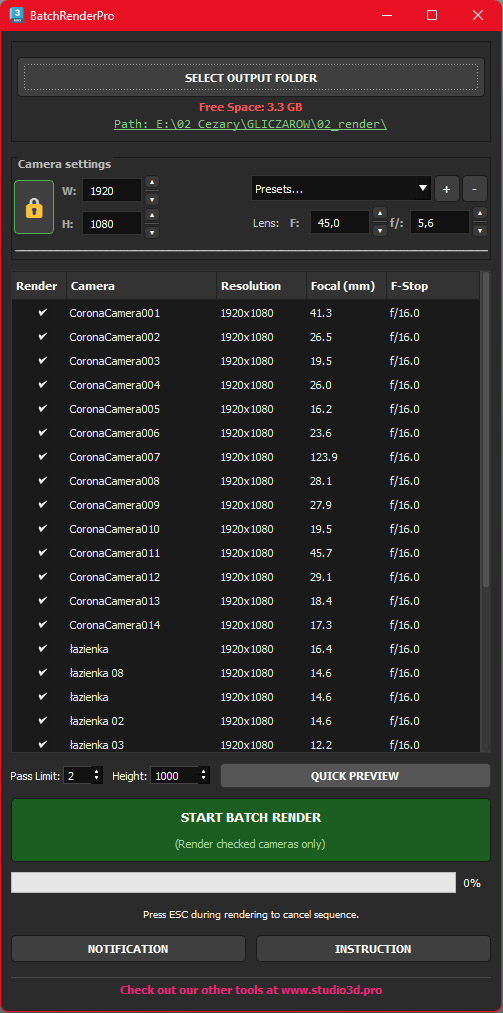
- Lists all cameras and reads global resolution from Render Setup.
- Selects all cameras by default.
- Automatically names render files to match the camera name.
What else can it do?
Disk Space
Displays how much free space is left on the destination drive.
Resolution & Lens Overrides
Any changes here apply to selected cameras in the list.
- W / H: Set output width and height.
- 🔒 Lock: Keep aspect ratio when changing W or H.
- Presets: Choose standard formats or save your own using [+].
- Manage [-]: Rename or delete your custom presets.
- Lens: Override Focal Length and F-Stop on the fly.
Camera Selection
- Single Click: Switches the view to the selected camera and updates Safe Frame.
- Select Camera: Selects the object in the scene for quick access to other parameters.
- Multi-Edit: You can change settings for multiple cameras simultaneously. Note: Viewport will NOT change when multiple cameras are selected.
Raw + JPG
Automatically creates a .jpg file for every render based on your base lighting settings.
Telegram Notification
Sends a notification with a .jpg preview after each completed render and informs you when the entire process is finished.